• 제트팩 컴포즈는 안드로이드에서 네이티브 사용자 인터페이스를 구축하기 위한 현대적인 툴킷입니다. 구성 가능한 기능을 기반으로 한 선언적 UI 프레임워크를 사용하여 UI 개발을 더 빠르고 쉽게 만듭니다.
• 그러나 제트팩 컴포즈는 UI 요소에 대한 안정적인 식별자를 제공하지 않아 아피움과 같은 도구로 테스트를 자동화하기 어려울 수 있다. 한 가지 대안은 '콘텐츠 설명'을 사용하는 것이지만 이는 접근성에 부정적인 영향을 미칠 수 있다.
• 이를 해결하기 위해 제트팩 컴포즈는 개발자가 테스트 목적으로 UI 트리의 노드를 고유하게 식별할 수 있는 '테스트태그' 속성을 도입했다. 그러나 UiAutomator2와 Appium은 현재 'testTag'의 인식을 지원하지 않는다.
• 해결 방법으로 개발자는 MainActivity.kt 파일의 'semantics { testTagsAsResourceId = true }' 구문을 사용하여 테스트 태그를 리소스 ID로 처리할 수 있습니다. 이를 통해 아피움은 리소스-id를 로케이터로 사용하여 요소와 상호 작용할 수 있으므로 보다 신뢰할 수 있는 테스트 자동화가 가능하다.
• 안드로이드 스튜디오에 제미니가 도입되면서 개발자들은 컨텍스트 기반 코드 제안과 자동 완성 기능을 제공할 수 있는 강력한 AI 도구에 접근할 수 있게 됐다. 그러나 민감하거나 독점적인 코드를 구글과 공유하면 지적 재산권 보호에 대한 우려가 제기될 수 있다.
• 민감한 코드를 보호하기 위해 안드로이드 스튜디오는 사용자가 제미니와의 프로젝트 코드 공유를 제어할 수 있는 사용자 정의 가능한 설정을 제공한다. 개발자는 모든 프로젝트 코드, 특정 프로젝트를 허용하거나 프로젝트 코드 공유를 선택할 수 있습니다.
• 포괄적인 보호를 보장하기 위해 개발자는 제외하려는 디렉토리의 상단 수준에서 .aiexclude라는 파일을 만들 수 있습니다. .gitignore와 유사한 이 파일은 별표(*)를 포함하여 모든 파일과 하위 폴더를 재귀적으로 제외할 수 있어 Gemini가 코드에 액세스하는 것을 방지할 수 있습니다.
• 제미니의 코드 완료 기능은 .aiexclude 파일을 사용할 때 비활성화될 수 있지만 개발자는 여전히 특정 코드베이스와 관련이 없는 일반 질문에 대해 도구를 활용할 수 있다.
# for m in genai.list_models(): # if 'generateContent' in m.supported_generation_methods: # print(m.name)
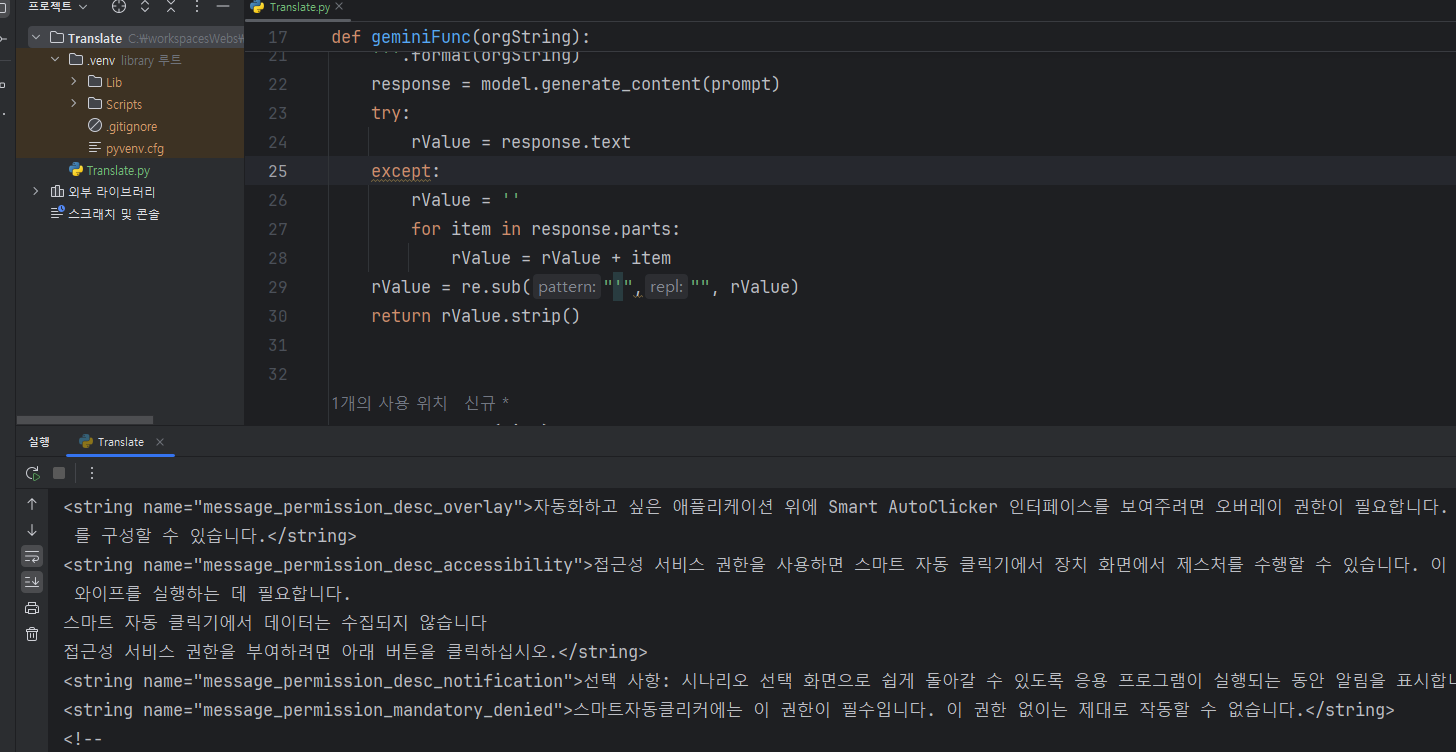
def geminiFunc(orgString): model = genai.GenerativeModel('gemini-pro') prompt = ''' Translate English sentences '{0}' into Korean naturally. Use expressions that feel natural to Korean speakers. '''.format(orgString) response = model.generate_content(prompt) try: rValue = response.text except: rValue = '' for item in response.parts: rValue = rValue + item rValue = re.sub("'","", rValue) return rValue.strip()
def doRead(path, fileName): path = re.sub(r"\\", '/', path) xPath = path.split('/') xPath[xPath.index('values')] = 'values-ko' nPath = '/'.join(xPath) f = open(fileName, 'r', encoding='UTF-8') if not os.path.isdir(nPath): os.makedirs(nPath) ot = open(os.path.join(nPath, 'strings.xml'), 'w', encoding='UTF-8') rValue = '' rName = '' addTy = False while True: line = f.readline() if not line: break if line.strip() == '': continue try: if line.strip().startswith('<string name') and '</string>' in line and 'false' not in line: rValue = getTranslate(line) rName = getName(line) rValue = '<string name="{0}">{1}</string>'.format(rName, rValue) print(rValue.strip()) ot.write(rValue + '\n') addTy = False elif line.strip().startswith('<string name') and '</string>' not in line and 'false' not in line: rValue = line.strip().split('>')[1] rName = getName(line) addTy = True elif addTy and '</string' in line: rValue += line.strip().split('<')[0] rValue = geminiFunc(rValue) rValue = '<string name="{0}">{1}</string>'.format(rName, rValue) print(rValue.strip()) ot.write(rValue + '\n') rValue = '' addTy = False else: if addTy: rValue += line else: rValue = line print(rValue.strip()) ot.write(rValue + '\n') except: print(path, fileName, line) ot.close() f.close()
print('JOB START...') for (root, directory, files) in os.walk(baseDir): for file in files: if not ('values-' not in root and 'strings.xml' in file): continue print(root, file) doRead(root, os.path.join(root, file)) print('JOB END...')
이전 글에서도 한번 해 보았던 기억이 있기는 합니다. 이번에 조금 더 수정을 해 보았습니다.
실행결과
이번에는 앱에 정리 되어 있는 strings.xml 파일을 찾아서 한 줄씩 읽어 한국어 파일을 만들고 values-ko 폴더에 저장하는 것 까지을 한 번에 해 보았습니다. 그렇게 하고 앱을 실행해 보면 한국 어을 모르던 앱이 한국어를 표시하게 됩니다.
다만, gemini api 을 호출할 때 번역을 조금 자연스럽게 해 달라고 prompt을 만들었더니, 조금은 앱이 이상한(?) 표현을 할 수 도 있습니다.
prompt = '''
Translate English sentences '{0}' into Korean naturally. Use expressions that feel natural to Korean speakers.
'''.format(orgString)
번역은 자연스럽게 하기는 하겠지만, 그런 것이 앱에서 표현 되는 게 맞는 가 싶기도 합니다. 아무튼...
번역된 앱 실행 모습
한국어로 표시를 하기 시작했습니다. ㅋ~
한국어가 표시 되도록 수정된 github 링크을 공유해 드려요. 원작자의 코드을 fork 해서 수정한 버전 임을 알려 드려요.
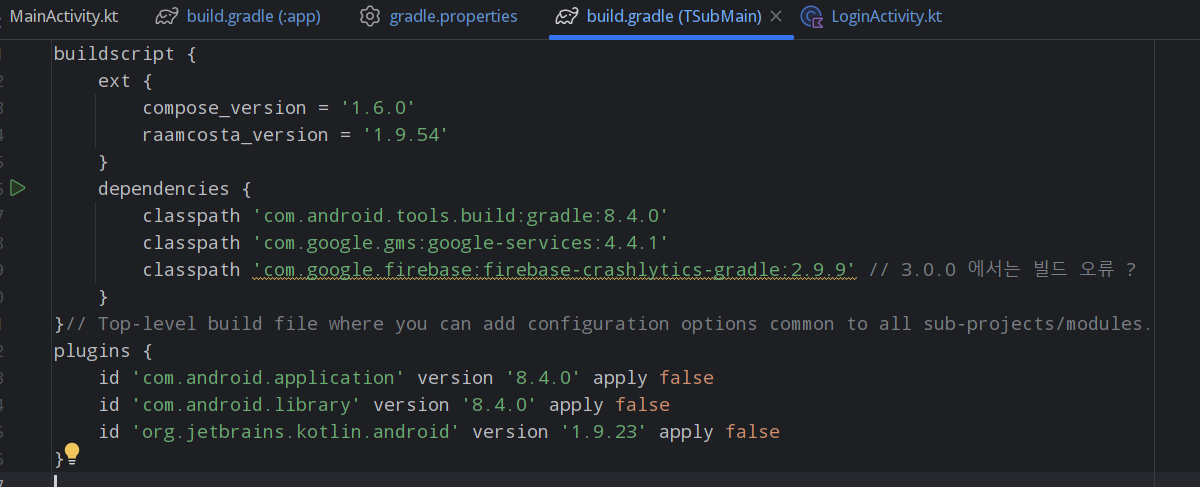
buildscript {
    ext {
        compose_version = '1.6.0'
        raamcosta_version = '1.9.54'
    }
    dependencies {
        classpath 'com.android.tools.build:gradle:8.4.0'
        classpath 'com.google.gms:google-services:4.4.1'
        classpath 'com.google.firebase:firebase-crashlytics-gradle:2.9.9' // 3.0.0 에서는 빌드 오류 ?
    }
}// Top-level build file where you can add configuration options common to all sub-projects/modules.
plugins {
    id 'com.android.application' version '8.4.0' apply false
    id 'com.android.library' version '8.4.0' apply false
    id 'org.jetbrains.kotlin.android' version '1.9.23' apply false
}
com.google.firebase:firebase-crashlytics-gradle 가 패치가 되기는 한 것 같은데... 그것이 오류를 발생시키고 있다는 사실을...