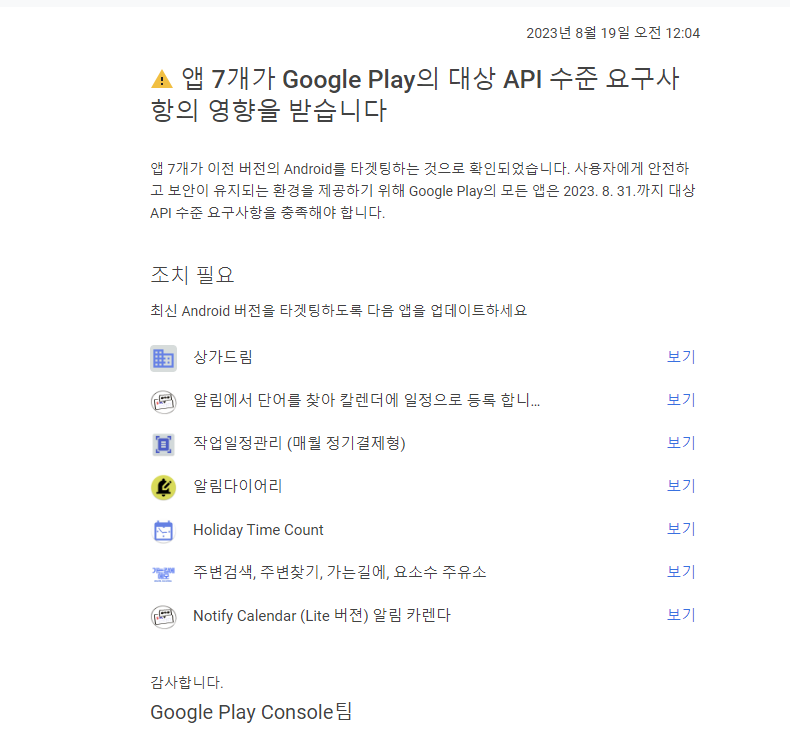
이전에 게시했던 앱들 중에서 관리가 소홀한 앱들에 대한 경고 메일을 받았습니다. 이것들을 8.31까지 정리해야 한다고 합니다.

결국 playstore 가 요구 하는 게시 기준은 API 33 ( 안드로이드 13) 이상이 되어야 한다는 것입니다. 이제 이전 안드로이드 폰이 얼마나 되는지는 알 수 없으나, 더 이상은 게시를 할 수 없다는 이야기가 될 것 같습니다.

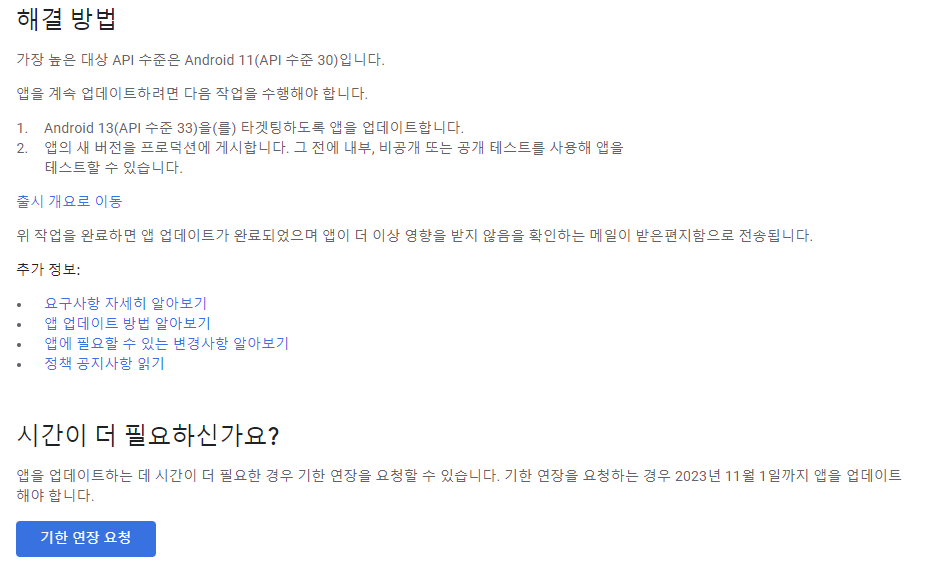
다행히도 기한 연장 요청을 받고 있다고 합니다. 그것도 11월 1일까지 3개월 정도 이기는 하지만 말입니다. 그래서 이번 주 내로 정리해서 API 수준으로 34로 진행해 볼 생각입니다.
다만, android studio 버전이나, gradle 버전에 따라 API 34 을 지정했을 경우 에러 표시가 되는 경우가 있습니다. 이런 때에는 다음과 같이 gradle 파일을 조정해 주시면 됩니다.
android {
    compileSdk 34
    namespace "com.bil.....511"

    defaultConfig {
        applicationId "com......p511"
        minSdkVersion 26
        //noinspection EditedTargetSdkVersion 검사 없음 편집된 대상 Sdk 버전
        targetSdkVersion 34
        versionCode 2
        versionName "1.0.2"

        testInstrumentationRunner "androidx.test.runner.AndroidJUnitRunner"
    }

    buildTypes {
        release {
            minifyEnabled false
            proguardFiles getDefaultProguardFile('proguard-android-optimize.txt'), 'proguard-rules.pro'
        }
    }
    compileOptions {
        sourceCompatibility JavaVersion.VERSION_17
        targetCompatibility JavaVersion.VERSION_17
    }

    viewBinding {
        enabled = true
    }
}
build 을 하다 보면 이런 메시지가 나오기는 합니다.
AGPBI: {"kind":"warning","text":"We recommend using a newer Android Gradle plugin to use compileSdk = 34\n\nThis Android Gradle plugin (8.1.0) was tested up to compileSdk = 33 (and compileSdkPreview = \"UpsideDownCakePrivacySandbox\").\n\nYou are strongly encouraged to update your project to use a newer\nAndroid Gradle plugin that has been tested with compileSdk = 34.\n\nIf you are already using the latest version of the Android Gradle plugin,\nyou may need to wait until a newer version with support for compileSdk = 34 is available.\n\nTo suppress this warning, add/update\n android.suppressUnsupportedCompileSdk=34\nto this project's gradle.properties.","sources":[{}]}
그래도 지금은 무시하고 넘어갑니다. 그래도 아직 발견 되는 오류는 없습니다. 개발에 사용하고 있는 android studio 버전은 다음과 같습니다.
Android Studio Giraffe | 2022.3.1
Build #AI-223.8836.35.2231.10406996, built on June 29, 2023
Runtime version: 17.0.6+0-b2043.56-10027231 amd64
VM: OpenJDK 64-Bit Server VM by JetBrains s.r.o.
Windows 11 10.0
GC: G1 Young Generation, G1 Old Generation
Memory: 4096M
Cores: 8
Registry:
external.system.auto.import.disabled=true
debugger.new.tool.window.layout=true
ide.text.editor.with.preview.show.floating.toolbar=false
ide.instant.shutdown=false
ide.experimental.ui=true
Non-Bundled Plugins:
com.jetbrains.kmm (0.6.1(223)-18)
org.jetbrains.compose.desktop.ide (1.4.3)
이제 발등에 떨어진 불(?)을 끄기 위해 가 보겠습니다. 총총총...


댓글 없음:
댓글 쓰기