외국인 관광객을 위한 앱 만들기 : Jetpack Compose에서 Google Maps로 실시간 위치 추적 및 야간 모드 적용하기
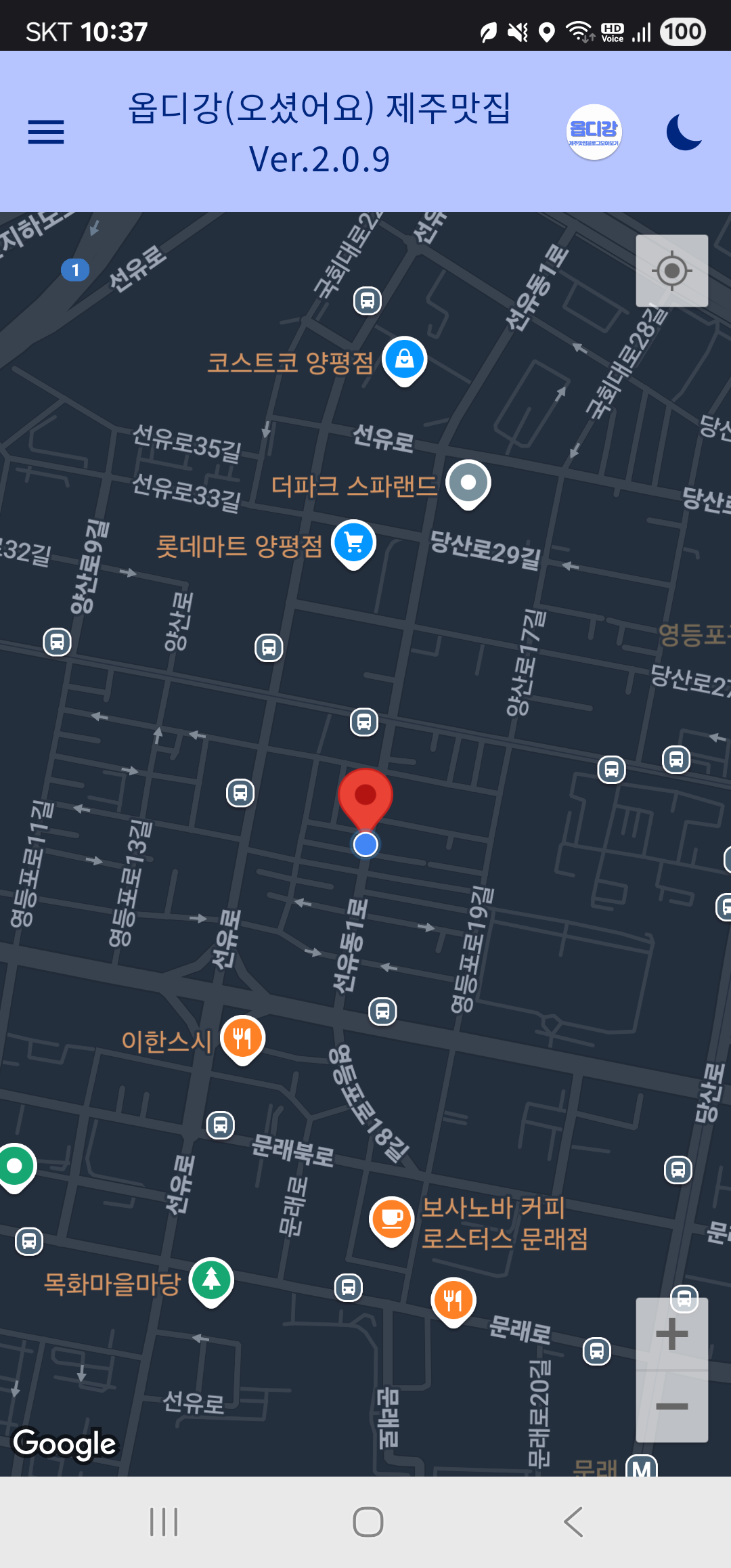
Jetpack Compose에서 Google Map을 전면에 표시하고, 실시간으로 위치를 추적하며 지도 카메라를 이동시키고, 야간 모드까지 적용하는 방법을 단계별로 정리합니다.
1. Hilt ViewModel에서 위치 실시간 추적
FusedLocationProviderClient를 활용하여 위치를 계속 추적합니다:
@HiltViewModel
class LocationViewModel @Inject constructor(
    @ApplicationContext private val context: Context
) : ViewModel() {

    private val fusedLocationClient = LocationServices.getFusedLocationProviderClient(context)
    private val _locationFlow = MutableStateFlow<LatLng?>(null)
    val locationFlow: StateFlow<LatLng?> = _locationFlow

    private val locationCallback = object : LocationCallback() {
        override fun onLocationResult(result: LocationResult) {
            result.lastLocation?.let {
                _locationFlow.value = LatLng(it.latitude, it.longitude)
            }
        }
    }

    init {
        val request = LocationRequest.Builder(Priority.PRIORITY_HIGH_ACCURACY, 3000).build()
        if (ActivityCompat.checkSelfPermission(context, Manifest.permission.ACCESS_FINE_LOCATION) == PackageManager.PERMISSION_GRANTED) {
            fusedLocationClient.requestLocationUpdates(request, locationCallback, Looper.getMainLooper())
        }
    }

    override fun onCleared() {
        fusedLocationClient.removeLocationUpdates(locationCallback)
    }
}
2. Compose에서 지도와 위치 UI 표시
ViewModel의 위치를 수신하여 Google Map 카메라를 이동시킵니다:
@Composable
fun RealTimeLocationMapScreen(viewModel: LocationViewModel = hiltViewModel()) {
    val cameraPositionState = rememberCameraPositionState()
    val currentLocation by viewModel.locationFlow.collectAsState()

    LaunchedEffect(currentLocation) {
        currentLocation?.let {
            cameraPositionState.animate(
                update = CameraUpdateFactory.newLatLngZoom(it, 16f),
                durationMs = 1000
            )
        }
    }

    GoogleMap(
        modifier = Modifier.fillMaxSize(),
        cameraPositionState = cameraPositionState,
        properties = MapProperties(isMyLocationEnabled = true),
        uiSettings = MapUiSettings(
            myLocationButtonEnabled = true,
            zoomControlsEnabled = true,
            compassEnabled = true
        )
    )
}
3. 위치 권한 요청 (Compose)
@Composable
fun RequestLocationPermissions(onPermissionsGranted: () -> Unit) {
    val context = LocalContext.current
    val permissionLauncher = rememberLauncherForActivityResult(
        ActivityResultContracts.RequestMultiplePermissions()
    ) { permissions ->
        if (permissions[Manifest.permission.ACCESS_FINE_LOCATION] == true) {
            onPermissionsGranted()
        }
    }

    LaunchedEffect(Unit) {
        permissionLauncher.launch(arrayOf(
            Manifest.permission.ACCESS_FINE_LOCATION,
            Manifest.permission.ACCESS_COARSE_LOCATION
        ))
    }
}
4. Google Map 옵션 설정 (내 위치 버튼 등)
GoogleMap(
    properties = MapProperties(
        isMyLocationEnabled = true
    ),
    uiSettings = MapUiSettings(
        myLocationButtonEnabled = true,
        zoomControlsEnabled = true,
        compassEnabled = true,
        rotateGesturesEnabled = true
    )
)
5. Google Map에 야간 모드 적용하기
야간 스타일 JSON을 res/raw 또는 assets로 저장한 후 적용합니다.
1. res/raw/google_night_style.json 예시:
[
  { "elementType": "geometry", "stylers": [ { "color": "#242f3e" } ] },
  { "elementType": "labels.text.fill", "stylers": [ { "color": "#746855" } ] }
  // ...
]
2. 적용 코드:
val mapStyle = remember {
    MapStyleOptions.loadRawResourceStyle(context, R.raw.google_night_style)
}

GoogleMap(
    properties = MapProperties(
        isMyLocationEnabled = true,
        mapStyleOptions = mapStyle
    )
)
6. 시스템 다크 모드에 따라 자동 전환
@Composable
fun getMapStyleByUiMode(context: Context): MapStyleOptions {
    return if (isSystemInDarkTheme()) {
        MapStyleOptions.loadRawResourceStyle(context, R.raw.google_night_style)
    } else {
        MapStyleOptions.loadRawResourceStyle(context, R.raw.google_day_style)
    }
}
마무리
Jetpack Compose를 활용해 Google Maps에 실시간 위치를 반영하고, 다양한 사용자 경험을 위해 UI 옵션 및 스타일을 적용하는 방법을 정리했습니다.
야간 모드 스타일링이나 위치 추적 성능 최적화는 향후 앱 완성도에 매우 중요하므로 잘 적용해 보시기 바랍니다.


댓글 없음:
댓글 쓰기