2026/02/21

오늘의 이야기

오늘은 파이썬으로 메시지를 보내 보도록 하겠다... 어디로  내 안드로이드 폰으로 다가... 그래서 먼저 안드로이드에서 하는 FCM에 대한 이해를 조금해 보아야 하지 않을까 싶다.


https://billcorea.tistory.com/80


안드로이드 앱 만들기 Firebase FCM 으로 메시지 전송하기


Fcm 으로 메시지를 수신하는 예제들은 많이 찾아 볼 수 있으나, 보내는 건 ? 그것도 안드로이드 앱으로 그런 예제는 없는 것 같아서 정리를 해 보겠다. 다만, 전체를 다 정리하는 것이 아니라 꼭


billcorea.tistory.com


옆집(?)에 잠시 가 보면 안드로이드에서 하는 메시지 보내는 것에 대한 이야기가 있으니 참고...


import firebase_admin
from firebase_admin import credentials
from firebase_admin import db
from firebase_admin import messaging
import datetime

#Firebase database 인증 및 앱 초기화
cred = credentials.Certificate('./services_firebase.json')
firebase_admin.initialize_app(cred,{
'databaseURL' : 'https://my-.........firebasedatabase.app/'
})


def mesgSend(token):
registration_token = token

# See documentation on defining a message payload.
message = messaging.Message(
notification=messaging.Notification(
title='$GOOG up 1.43% on the day',
body='$GOOG gained 11.80 points to close at 835.67, up 1.43% on the day.',
),
android=messaging.AndroidConfig(
ttl=datetime.timedelta(seconds=3600),
priority='normal',
notification=messaging.AndroidNotification(
icon='stock_ticker_update',
color='#f45342'
),
),
apns=messaging.APNSConfig(
payload=messaging.APNSPayload(
aps=messaging.Aps(badge=42),
),
),
data={
'URL':'https://billcorea.tistory.com',
'BODY':'message is Body'
},
#topic='allDevices',
token=registration_token,
)

# Send a message to the device corresponding to the provided
# registration token.
response = messaging.send(message)
# Response is a message ID string.
print('Successfully sent message:', response)


userInfo = db.reference('UserInfo')
#print(type(userInfo.get()))
for val in userInfo.get().values():
mesgSend(val['userToken'])

소스에 대한 이해는 나중에 하고, 일단 따라해 보자면.


위에 대한 소스를 작성을 해서 해 보면 된다.   소스를 보면서 준비를 해 보자...


1. 서버 인증서 만들기 


./services_firebase.json 이 파일이 있으면 인증서를 대신할 수 있다. 이건 어디서 얻는 것인가 ?  firebase의 console 에서 프로젝트 설정을 가면 서비스 계정이라고 탭이 있고 거기서 새 비공개키 생성 을 클릭 하면 자동으로 생성이 되는 json 파일 있다. 그 파일의 이름은 프로젝트 이름을 따라서 생성이 되기 때문에 길다... 그걸 좀 줄였다.   이 파일은 android 개발할 때도 받았던 파일 이였다. 같은 걸 쓰면 될 것을... 


firebase 서버키를 받아보자


2.  메시지 수신할 상대방을 어떻게 알 것인가 ?


안드로이드 개발페이지 에서 기술한 것 처럼 topic 을 구독하는 방식을 구현 했다면 topic 으로 전달 할 수 있고,  그렇지 않다면 개발 기기 마다 등록한 token 을 알아야 한다.    그래서  이 소스에서는 firebase의 realtime database 에 userInfo 라는 정보에 그런 정보가 있다는 가정하에 코드를 작성하였다.  그래서 userInfo 라는 realtime database 을 읽어서 userToken을 받아오는 부분이 기술 되어 있다.


import ...

cred = credentials.Certificate('./services_firebase.json')
firebase_admin.initialize_app(cred,{
'databaseURL' : 'https://my-a.........................firebasedatabase.app/'
})

userInfo = db.reference('UserInfo')
#print(type(userInfo.get()))
for val in userInfo.get().values():
mesgSend(val['userToken'])

 이부분에서 databaseURL 은 어디서 가져 왔는 가 ?  firebase의 console 에서 realtime database 을 클릭해 보면 처음 화면에 아래 그림 처럼 https://... 으로 시작하는 URL 이 기술 되어 있으니 그걸 복사해서 붙이면 끝.
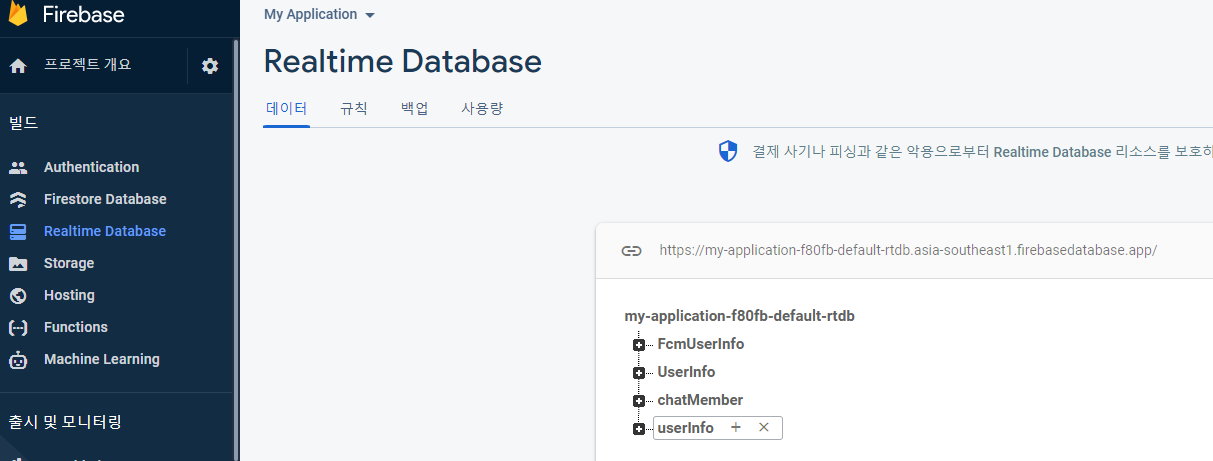

database URL


3. 메시지 보내기


이제 token 도 얻어 왔으니 (실제 얻어 오는 건 안드로이드 개발 부분에서 참고 하시길 ...)  메시지를 보내 보자.  function 으로 define 해 두면 나중에 복사해 쓰기 쉬우니... 이렇게 코드를 작성했다.  여기서 token 은 userInfo 에서 얻어온 것이고...   아래 부분은 잘 알 수도 있지만, notification 에 있는 건 안드로이드 폰에 알림창에 표시되는 내용이고


androidConfig 는 잘 모르겠지만, 안드로이드에서 보여줄 때 사용될 설정인 것 같고,  아래 data= 에 들어가는 건, 자기가 개발하는 앱에 전달할 데이터 부분으로 사용하면 될 것 같다.


def mesgSend(token):
registration_token = token

# See documentation on defining a message payload.
message = messaging.Message(
notification=messaging.Notification(
title='$GOOG up 1.43% on the day',
body='$GOOG gained 11.80 points to close at 835.67, up 1.43% on the day.',
),
android=messaging.AndroidConfig(
ttl=datetime.timedelta(seconds=3600),
priority='normal',
notification=messaging.AndroidNotification(
icon='stock_ticker_update',
color='#f45342'
),
),
apns=messaging.APNSConfig(
payload=messaging.APNSPayload(
aps=messaging.Aps(badge=42),
),
),
data={
'URL':'https://b.............com',
'BODY':'message is Body'
},
#topic='allDevices',
token=registration_token,
)

# Send a message to the device corresponding to the provided
# registration token.
response = messaging.send(message)
# Response is a message ID string.
print('Successfully sent message:', response)


4. 마치며.


음... 그런데, 아쉽게도 windows 에서는 검증을 해 보지 못했다. firebase_admin 패키지를 설치해야 하는데, windows11 에 python 3.9 을 설치한 지금은 이상하게도 firebase_admin 패키지 설치가 되지 않는다. 이유는 아직 모른다.  그래서 linux 가 설치된 rasberry pi 3B 을 이용해서 확인했고, 전달이 잘 되는 것도 확인 했다.
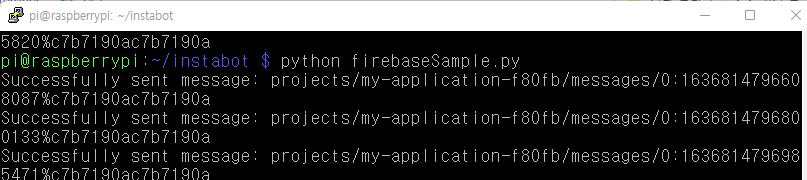

메시지 보내는 화면


이번에는 폰에 메시지가 도착하고 확인하는 예제 화면을 잠시 ... 감상(?)하는 것으로 마무리...


오늘의 이야기


#스하리1000명프로젝트,
Terkadang sulit untuk berbicara dengan pekerja asing, bukan?
Saya membuat aplikasi sederhana yang membantu! Anda menulis dalam bahasa Anda, dan orang lain melihatnya dalam bahasa mereka.
Ini menerjemahkan secara otomatis berdasarkan pengaturan.
Sangat berguna untuk obrolan mudah. Lihatlah ketika Anda mendapat kesempatan!
https://play.google.com/store/apps/details?id=com.billcoreatech.multichat416


오늘의 이야기

오늘은 글쓰기가 귀차니즘으로 티스토리에 적어 두었던 글들을 네이버 블로그에 옮겨 보자.


1. 옮기는 방법을 찾아보니. 


https://developers.naver.com/docs/share/navershare/


네이버 공유하기 개발가이드


NAVER Developers - 네이버 공유하기 개발가이드


developers.naver.com


네이버 공유하기 가 있다. 이걸 어떻게 이용하면 될까? 생각해 보고, 일단은 저 스크립 트을 따라 해 보았다. 그랬더니, 블로그로 글을 옮겨주는 페이지를 열어 준다. 오호라~ 그렇다면... 하는 생각이 번쩍 스친다...


2. 이제 티스토리의 글목록은 어떻게 얻을 것인가 ?


https://tistory.github.io/document-tistory-apis/apis/v1/post/list.html


글 목록 · GitBook


No results matching ""


tistory.github.io


글목록은 얻어오는 방법은 티스트로 api 가이드를 참고해 보면 알 수 있다.  몇 번 해 본 것들이니 따로 설명은 생략.


3. 이제 소스 작업을 해 보자.


#coding=utf-8
import json
import sqlite3
import time

import pyperclip
import requests
from urllib import parse
from selenium import webdriver
from selenium.webdriver import ActionChains, Keys
from selenium.webdriver.common.by import By

conn = sqlite3.connect("test.sqlite", isolation_level=None)
rs = conn.cursor()
rs.execute("CREATE TABLE IF NOT EXISTS myUrlList \
(id integer PRIMARY KEY, url text, Name text, writeDate text)")

path = "C:\\Users\\nari4\\Documents\\python_workspaces\\chromedriver.exe"
browser = webdriver.Chrome(path)

blog_name = "b.....a"
client_id = "c......................6753a"
seckey = "cf6e..............................................................0efb7"
callback_url = "http://b......a.tistory.com"
getUrl = 'https://www.tistory.com/oauth/authorize?client_id={0}&redirect_uri={1}&response_type=code&state=someValue'
getUrl = getUrl.format(client_id, callback_url)
#1 print(getUrl)

def getToken():
code = '901.............................................895568dc642f63da08'
token_url="https://www.tistory.com/oauth/access_token?client_id={0}&client_secret={1}&redirect_uri={2}&code={3}&grant_type=authorization_code".format(client_id, seckey, callback_url, code)
res = requests.get(token_url)
access_token = res.text.split("=")[1]
print(access_token)

def clipboard_input(user_type, user_xpath, user_input):
temp_user_input = pyperclip.paste() # 사용자 클립보드를 따로 저장

pyperclip.copy(user_input)
browser.find_element(user_type, user_xpath).click()
ActionChains(browser).key_down(Keys.CONTROL).send_keys('v').key_up(Keys.CONTROL).perform()

pyperclip.copy(temp_user_input) # 사용자 클립보드에 저장 된 내용을 다시 가져 옴
time.sleep(1)

#2 getToken()
access_token = 'cef.....................................................f45333'

url_getPostList = "https://www.tistory.com/apis/post/list?access_token={0}&output={1}&blogName={2}&page={3}".format(access_token, 'json', blog_name, 1)
res = requests.get(url_getPostList)
jsonObject = json.loads(res.text)
iCnt = 0;
for idx in range(int(int(jsonObject.get('tistory').get('item').get('totalCount')) / 10), 0, -1):
print(idx)
url_getPostList = "https://www.tistory.com/apis/post/list?access_token={0}&output={1}&blogName={2}&page={3}".format(
access_token, 'json', blog_name, idx)
res = requests.get(url_getPostList)
jsonObject1 = json.loads(res.text)
data = jsonObject1.get('tistory')
for item in data.get('item').get('posts'):
# 모바일앱 카테고리의 글만 20 발행인 글만
if '933360' in item.get('categoryId') and '20' in item.get('visibility'):
naverUrl = 'https://share.naver.com/web/shareView?url={0}&title={1}'.format(parse.quote(item.get('postUrl')), parse.quote(item.get('title')))
print(item.get('id'))
print(naverUrl)
browser.get(naverUrl)
browser.find_element(By.CLASS_NAME, 'btn_next').click()
time.sleep(1)

if iCnt == 0:
# 아이디 입력
clipboard_input(By.XPATH, '//*[@id="id"]', 'na......k')
time.sleep(1)
# 비밀번호 입력
clipboard_input(By.XPATH, '//*[@id="pw"]', 'NTF......4')
time.sleep(1)
# 로그인 버튼 클릭
browser.find_element(By.XPATH, '//*[@id="log.login"]').click()
browser.implicitly_wait(30)
browser.find_element(By.XPATH, '//*[@id="new.save"]').click()
time.sleep(1)

desc = browser.find_element(By.CLASS_NAME, 'dsc').text
clipboard_input(By.ID, 'content', desc)

browser.find_element(By.CLASS_NAME, 'btn_write').click()
iCnt += 1

반복적으로 하고 있는 것이기는 하지만, 아직도 좀 힘든 부분은 access_token을 얻어 오는 것이다.  전체 스크립트를 기술해 두었지만,  #1 print(getUrl) 을 최종적으로 막았지만, print(getUrl) 에서 출력되는 링크를 클릭해 들어가면 code 값을 얻을 수 있고, #2 getToken() 으로 막았지만, 저걸 풀고 getToken() 을 실행해 보면 access_token 을 얻을 수 있다. 


access_token 은 한번 얻고 나면 변경할 필요가 없는 것 같아서.  그다음부터는 위에서 처럼 #1, #2는 막아 두고 진행을 해도 된다. 


4. 그다음은 post 리스트를 얻어오는 링크를 실행해서 티스토리의 post 목록을 받아오고, 


5. 필요에 따라 카테고리 값을 구분해서 필요한 부분만 선택해서  네이버 블로그에 저장하는 처리를 진행한다.


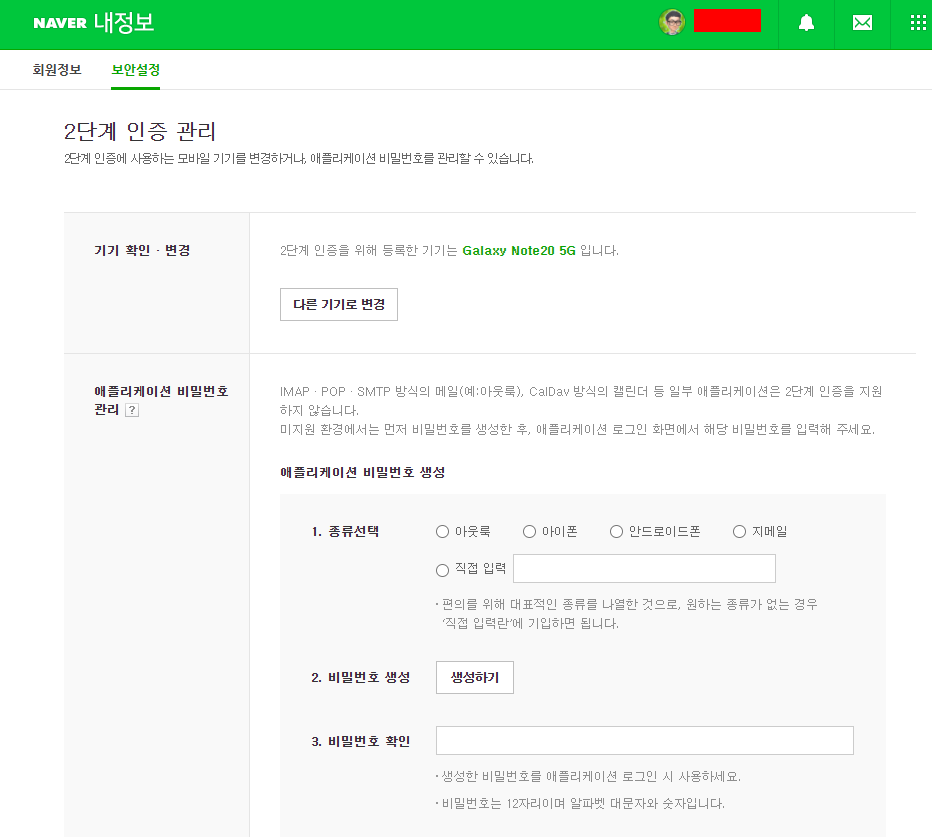
6. 진행하기 전에 네이버 내 정보에 들어가서 보안설정 - 2단계 인증 관리에서 애플리케이션 비밀번호 관리를 통해 파이썬 스크립트에서 사용할 비밀번호를 하나 생성한 다음 위의 스크립트를 진행해야 한다.  그렇지 않으면 자동화 스크립트에서 로그인하는 것을 네이버는 싫어해서 그림 캡챠를 돌려 로그인을 방해(?)하는 처리를 하고 있다. 


네이버 2단계 인증


7. 이렇게 하면 짜잔... 티스토리에 작성한 글들의 전체 본문은 아니지만 링크를 달아서 네이버 블로그에 다 담아 볼 수 있다. ㅎㅎㅎ


오늘의 이야기

인스타 그램에 사진 올리기를 해 보기로 했다.  음... 365일 24시간 구동해야 하는 컴터가 있으면야 좋기는 하겠지만, 


우리에게는 rasberrypi 가 있으니 그것으로 대신해 보기로 한다. 그래야 camera 도 사용할 수 있으니 말이다.


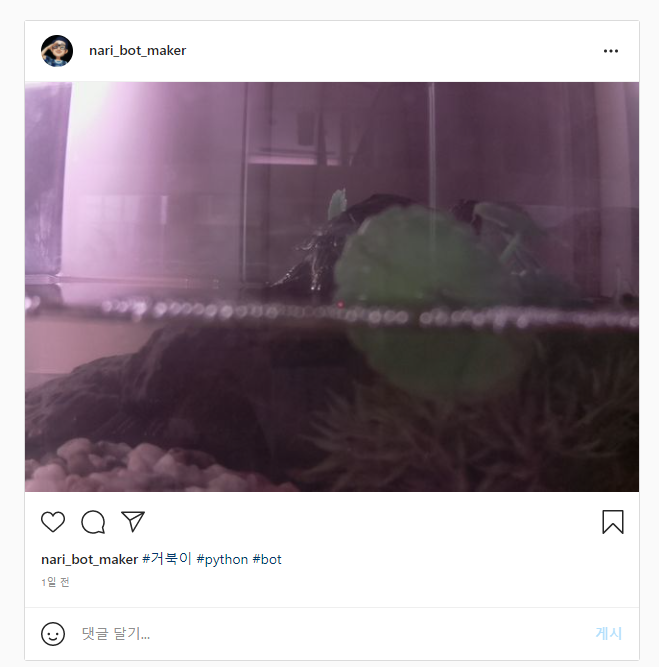
그리고 내게는 작은 어항에 살고 있는 반려 거북이도 하나 있으니 말이다.   일단 코드는 아래오 같이 구현 했다.


from instabot import Bot
import os
import shutil
import picamera

def clean_up():
dir = "config"
remove_me = "file.jpg.REMOVE_ME"
# checking whether config folder exists or not
if os.path.exists(dir):
try:
# removing it so we can upload new image
shutil.rmtree(dir)
except OSError as e:
print("Error: %s - %s." % (e.filename, e.strerror))
if os.path.exists(remove_me):
src = os.path.realpath("file.jpg")
os.rename(remove_me, src)

def upload_post():
camera = picamera.PiCamera()
camera.capture('file.jpg')

bot = Bot()
bot.login(username="nar......er", password="wl......")
#bot.upload_photo
bot.upload_photo("file.jpg", caption="#거북이 #python #bot")

if __name__ == '__main__':
clean_up()
upload_post()


그럼 이걸루 무엇을 할 수 있다는 것인지 ?


인스타그램 이미지


이렇게 매일 처럼 사진을 쩍어 자동으로 올리기를 할 수 있다는 말이 된다. ㅎㅎㅎ


https://www.instagram.com/nari_bot_maker/


쉽게 적용해 볼 수 있을 것 같기도 하고.


오늘의 이야기


#billcorea #운동동아리관리앱
🏸 Schneedle, aplikasi yang wajib dimiliki oleh klub bulu tangkis!
👉 Match Play – Rekam Skor & Temukan Lawan 🎉
Sempurna untuk di mana saja, sendirian, bersama teman, atau di klub! 🤝
Jika Anda suka bulu tangkis, cobalah

Buka aplikasi 👉 https://play.google.com/store/apps/details?id=com.billcorea.matchplay


오늘의 이야기

다음 메인 화면에 있는 것만 봐서는 내용이 그리 많이 나오지 않는 것 같다.  그래서 이번에는 다음 뉴스중에서 랭킹 뉴스를 스크랩 하는 sciprt 을 구성해 보기로 한다.


#coding=utf-8
#
import json
import urllib.request
import urllib.parse
from bs4 import BeautifulSoup
import ssl
import requests
import datetime

def daumResult():
print('')
now = datetime.datetime.now()
rValue = '''
<div align="center">자료수집 일시 : {0}</div>
<div></div>
<br></br>
'''.format(now)

context = ssl._create_unverified_context()
url = 'https://news.daum.net/ranking/popular'
html = urllib.request.urlopen(url, context=context).read()
soup = BeautifulSoup(html, 'html.parser')

hrefAll = []
srcAll = []
altAll = []
infoAll = []
descAll = []
items = soup.find_all(class_="link_thumb") # link_thumb info_news desc_thumb
for item in items:
hrefAll.append(item['href'])
img = BeautifulSoup(item.decode_contents(), 'html.parser')
imgsrc = img.find('img')
srcAll.append(imgsrc['src'])
altAll.append(imgsrc['alt'])

items = soup.find_all(class_="info_news") # link_thumb info_news desc_thumb
for item in items:
info = BeautifulSoup(item.decode_contents(), 'html.parser')
infoAll.append(info)

items = soup.find_all(class_="desc_thumb") # link_thumb info_news desc_thumb
for item in items:
desc = BeautifulSoup(item.decode_contents(), 'html.parser')
descSrc = desc.find('span')
descAll.append(descSrc.get_text().strip())

tr_add = "";
print(len(hrefAll))
for idx in range(1, (len(hrefAll))+1):
try:
tr_add += '''
<a href="{0}" target="_blank"><div>{1} -{2}-</div>
<div><img src="{3}" alt="{4}"/></div>
<div>{5}</div></a>
<br></br>
'''.format(str(hrefAll[idx]), str(altAll[idx]), str(infoAll[idx]), str(srcAll[idx]), str(altAll[idx]), descAll[idx])

if idx % 10 == 0:
tr_add += '''
<figure class="ad-wp" contenteditable="false" data-ke-type="revenue" data-ad-vendor="adsense" data-ad-id-pc="74706" data-ad-id-mobile="74709"></figure>
'''

except:
pass

end_tag = '''
<br></br>
<div> 이 글은 python script 을 이용하여 다음(www.daum.net) 메인 내용을 수집한 자료 입니다. </div>
'''
return rValue + tr_add + end_tag


blog_name = "a......ting"
client_id = "be43b5.........................3286e"
seckey = "be43b5c08..............................983c7915"
callback_url = "http://autoposting.tistory.com"
getUrl = 'https://www.tistory.com/oauth/authorize?client_id={0}&redirect_uri={1}&response_type=code&state=someValue'
getUrl = getUrl.format(client_id, callback_url)
#res = requests.get(getUrl, verify=False)
#print(getUrl)

def sendPost(category):
url_post = "https://www.tistory.com/apis/post/write"

visibility = 3; # 0 미발행 3 발행
#category = 1;
tag = '자동글쓰기, python, 다음_메인뉴스'
acceptComment = 1
title = '이시간 랭킹 뉴스 (다음) (파이썬 자동 글쓰기) '
content = daumResult()

headers = {'Content-Type': 'application/json; charset=utf-8'}
params = {
'access_token': access_token,
'output': 'json',
'blogName': blog_name,
'title': title,
'content': content,
'visibility': visibility,
'category': category,
'published':'',
'slogan':'',
'tag': tag,
'acceptComment': acceptComment,
'password':''
}
data = json.dumps(params)

rw = requests.post(url_post, headers=headers, data=data)
if rw.status_code == 200:
print('ok')
else:
print('fail')

# 등록시 입력
# 그떄 마다 token 을 변경하면 다시 받아야 함.
def getToken():
code = "421872a.......................................5b71908"
token_url="https://www.tistory.com/oauth/access_token?client_id={0}&client_secret={1}&redirect_uri={2}&code={3}&grant_type=authorization_code".format(client_id, seckey, callback_url, code)
#res = requests.get(token_url, verify=False)
#access_token = res.text.split("=")[1]
#print(access_token)

access_token = 'be7c.............................................a0ee119d'

url_getCategory = "https://www.tistory.com/apis/category/list?access_token={0}&output={1}&blogName={2}".format(access_token, 'json', blog_name)
res = requests.get(url_getCategory)
for r in res.json()['tistory']['item']['categories']:
print(r['id'] + " " + r['name'] + " 갯수=" + r['entries'])

sendPost('504263') # 특정한 카테고리 선택하기 위해서
print('Job END ...')

이전에 게시된 다른 스크립트들 처럼 개인적인 정보는 .... 으로 마킹을 했다.   또한 이 스크립트를 이용해서 매일 아침에 랭킹 뉴스를 스크랩 할 것이다.  하루 한 번... 반복적으로 여러번 하고 싶기도 하지만, 뭐 그럴 필요까지는 


스크랩 되어서 게시되는 모양이 이쁘지 않다면 html 코드을 이용해서 수정하면 될 것 같다.


다만, 주의가 필요해 보이는 것은 내용에 <a> 태크를 달아서 외부 링크를 사용하는 경우 이것이 많으면 광고을 유치(?)하기에는 무리가 따른다.  나의 글 보다 인용글이 많다는 의미로.  그래서 가급적이면 자동화를 하더라도 외부 인용은 자제(?)하는 것이 좋을 것 같다.


이걸루 또 한가지 스크랩 하는 기능을 구현 하였다.


오늘의 이야기

오호라... 피트에 있는 글들에 글을 달기 시작했더니, 방문해 주시고 댓글도 달아주시고... 감사 감사...


이런 걸 말로만 해서는 안되고 댓글에 또한 댓글로 인사를 해야 할 것 같아서 티스토리 API을 찾아 찾아서 댓글에 또한 댓글을 달아보자...


#coding=utf-8
#
import json
import sqlite3
import time
from datetime import datetime
import requests
import TELEGRAM_BOT as bot

conn = sqlite3.connect("test.sqlite", isolation_level=None)
rs = conn.cursor()
rs.execute("CREATE TABLE IF NOT EXISTS feedRecomment \
(id integer PRIMARY KEY, tid text, date text, postId text, name text, homepage text, comment text, open text, link text)")

#blog_name = "autoposting"
blog_name="billcorea"
client_id = "cf6.......................753a"
seckey = "cf6e................................1c5c0efb7"
callback_url = "http://billcorea.tistory.com"
getUrl = 'https://www.tistory.com/oauth/authorize?client_id={0}&redirect_uri={1}&response_type=code&state=someValue'
getUrl = getUrl.format(client_id, callback_url)
res = requests.get(getUrl)
# 아래 code 을 받기 위해서 getUrl 을 표시해서 IE 등으로 접속을 해야지 code 에 들어갈 값을 받는다.
# print("code=" +getUrl)
# input('... Enter')

# 등록시 입력
# 그때 마다 token 을 변경하면 다시 받아야 함.
def getToken():
code = "3955............................6377"
token_url="https://www.tistory.com/oauth/access_token?client_id={0}&client_secret={1}&redirect_uri={2}&code={3}&grant_type=authorization_code".format(client_id, seckey, callback_url, code)
res = requests.get(token_url)
access_token = res.text.split("=")[1]
print(':' + access_token)

# getToken()
# input('... Enter')


accessToken = 'cef406................................................f45333'
output_type='json'


def reComment(post_id, parentId):
days = ['월요일', '화요일', '수요일', '목요일', '금요일', '토요일', '일요일']
dayOfWeek = datetime.today().weekday()
hour = datetime.today().strftime("%H")
sMesg = "하루"
if int(hour) > 12:
sMesg = "오후"
if int(hour) > 17:
sMesg = "저녁"
if int(hour) > 20:
sMesg = "밤"
content = '행복한 {0} 평온한 {1} 되세요. \n오늘도 방문해 주셔서 감사합니다. \n댓글 달아 주셔서 감사합니다. \n항상 좋은 일만 있으시길 바랄께요. '.format(days[dayOfWeek], sMesg)
secret = '0'
writeUrl = 'https://www.tistory.com/apis/comment/write?access_token={0}&output={1}&blogName={2}&postId={3}&parentId={4}&content={5}&secret={6}'.format(accessToken, output_type, blog_name, post_id, parentId, content, secret)
res = requests.post(writeUrl)
jsonR = json.loads(res.text)
print(jsonR['tistory']['status'])
return jsonR['tistory']['status']


for iPage in range(1, 11):
print(str(iPage))
newEstUrl = 'https://www.tistory.com/apis/comment/newest?access_token={0}&output=json&blogName={1}&page={2}&count=10'.format(accessToken, blog_name, iPage)
print(newEstUrl)
res = requests.get(newEstUrl)
jsonRs = json.loads(res.text)

for comment in jsonRs['tistory']['item']['comments']:
name = comment['name']
name = name.encode('utf-8').decode('iso-8859-1')
print(name)
try:
if 'Billcorea' != name:
print('[' + str(1) + '] postId=' + comment['postId'] + ' id=' + comment['id'] + ' name=' + name + ' data=' +
comment['date'])
rs.execute(''' select count(*) from feedRecomment
where tid = "{0}" and postId = {1} '''.format(comment['id'], comment['postId']))
if rs.fetchone()[0] == 1:
print(comment['postId'] + ' is exists')
else:
resCode = reComment(comment['postId'], comment['id'])
bot.sendMessage('write...post=' + comment['postId'] + ' name=' + name + ', resCode=' + resCode)
if resCode == '200':
rs.execute(''' insert into feedRecomment (tid, postId, date, name, homepage, comment, open, link)
values ("{0}", "{1}", "{2}", "{3}", "{4}", "{5}", "{6}", "{7}")
'''.format(comment['id'], comment['postId'], comment['date'], name,
comment['homepage'], comment['comment'].replace('"', ''), comment['open'],
comment['link']))
print('insert Data ...')
except Exception as e:
print('...', e)
bot.sendMessage('error message=' + e)

time.sleep(10)

bot.sendMessage("tistory recomment Job END.")
print('end Job')

여기서 주의가 필요한 것은 reComment(post_id, parentId) 함수를 호출하는 부분일 것 같다.


잠시 잠깐 착각을 하면 내 글에만 댓글을 내가 다는 꼴이 된다. writeUrl의 파라미터 에는 내 글의 postId와 댓글번호인 parentId을 전달해야 하니 정신 차리고 잘 전달을 해 주어야 소중한 댓글에 답글을 다는 함수처리가 완성된다.


p.s 이 스크립트도 반복적으로 실행하다 보면 동일한 댓글에 답급을 달까 싶어서 답급을 달은 댓글의 정보를 기록해 두었다. 그래야 같은 댓글에 답급을 반복해서 다는 불편한 일이 생기지 않을 테니 말이다.


그럼... 이 스크립트를 이용해서 할 수 있는 것이 하나 더 생길 것 같은 느낌적인 느낌은 뭘까? 


그건 다음에...


오늘의 이야기


#스하리1000명프로젝트,
Perdu en Corée ? Même si vous ne parlez pas coréen, cette application vous aide à vous déplacer facilement.
Parlez simplement votre langue : il traduit, recherche et affiche les résultats dans votre langue.
Idéal pour les voyageurs ! Prend en charge plus de 10 langues, dont l'anglais, le japonais, le chinois, le vietnamien et plus encore.
Essayez-le maintenant !
https://play.google.com/store/apps/details?id=com.billcoreatech.opdgang1127


2026/02/20

오늘의 이야기

다음 회차 로또 번호 분석 결과 및 추천 조합입니다.

**최종 분석 결과**

**1. 라운드별 증가 간격**
- 1192회차: [6, 7, 13, 3, 1]
- 1193회차: [3, 7, 3, 5, 4]
- 1194회차: [10, 2, 9, 9, 4]
- 1195회차: [12, 12, 6, 1, 2]
- 1196회차: [4, 3, 14, 11, 5]
- 1197회차: [4, 2, 19, 2, 15]
- 1198회차: [4, 3, 5, 1, 2]
- 1199회차: [8, 1, 5, 1, 1]
- 1200회차: [1, 2, 12, 4, 12]
- 1201회차: [2, 15, 3, 8, 1]
- 1202회차: [7, 9, 12, 4, 3]
- 1203회차: [3, 12, 11, 6, 4]
- 1204회차: [8, 12, 2, 1, 13]
- 1205회차: [3, 12, 7, 8, 10]
- 1206회차: [2, 14, 9, 1, 15]
- 1207회차: [12, 2, 3, 11, 7]
- 1208회차: [21, 3, 6, 2, 4]
- 1209회차: [15, 3, 15, 2, 2]
- 1210회차: [6, 2, 8, 10, 11]
- 1211회차: [3, 1, 8, 3, 2]

**2. 라운드별 짝수/홀수 개수 및 비율**
- 1192회차: 4E2O
- 1193회차: 3E3O
- 1194회차: 3E3O
- 1195회차: 2E4O
- 1196회차: 3E3O
- 1197회차: 2E4O
- 1198회차: 4E2O
- 1199회차: 4E2O
- 1200회차: 4E2O
- 1201회차: 2E4O
- 1202회차: 3E3O
- 1203회차: 3E3O
- 1204회차: 4E2O
- 1205회차: 3E3O
- 1206회차: 3E3O
- 1207회차: 2E4O
- 1208회차: 4E2O
- 1209회차: 2E4O
- 1210회차: 2E4O
- 1211회차: 3E3O

**3. 라운드별 총합 및 동일 총합 출현 간격**
- 1192회차: 164, None
- 1193회차: 102, None
- 1194회차: 114, None
- 1195회차: 148, None
- 1196회차: 149, None
- 1197회차: 110, None
- 1198회차: 207, None
- 1199회차: 158, None
- 1200회차: 75, None
- 1201회차: 138, None
- 1202회차: 148, 7
- 1203회차: 130, None
- 1204회차: 157, None
- 1205회차: 116, None
- 1206회차: 116, 1
- 1207회차: 166, None
- 1208회차: 179, None
- 1209회차: 120, None
- 1210회차: 99, None
- 1211회차: 189, None

**4. 라운드별 평균 및 동일 평균 출현 간격**
- 1192회차: 27.33, None
- 1193회차: 17.00, None
- 1194회차: 19.00, None
- 1195회차: 24.67, None
- 1196회차: 24.83, None
- 1197회차: 18.33, None
- 1198회차: 34.50, None
- 1199회차: 26.33, None
- 1200회차: 12.50, None
- 1201회차: 23.00, None
- 1202회차: 24.67, 7
- 1203회차: 21.67, None
- 1204회차: 26.17, None
- 1205회차: 19.33, None
- 1206회차: 19.33, 1
- 1207회차: 27.67, None
- 1208회차: 29.83, None
- 1209회차: 20.00, None
- 1210회차: 16.50, None
- 1211회차: 31.50, None

**5. 라운드별 매칭 점수, 매칭 비율 및 동일 비율 출현 간격**
- 1192회차: None, None, None
- 1193회차: 0, 0.0%, None
- 1194회차: 1, 25.0%, None
- 1195회차: 0, 0.0%, 2
- 1196회차: 1, 25.0%, 2
- 1197회차: 0, 0.0%, 2
- 1198회차: 0, 0.0%, 2
- 1199회차: 1, 25.0%, 3
- 1200회차: 0, 0.0%, 2
- 1201회차: 0, 0.0%, 2
- 1202회차: 1, 25.0%, 3
- 1203회차: 0, 0.0%, 2
- 1204회차: 1, 25.0%, 2
- 1205회차: 1, 25.0%, 1
- 1206회차: 2, 50.0%, None
- 1207회차: 0, 0.0%, 4
- 1208회차: 0, 0.0%, 1
- 1209회차: 1, 25.0%, 4
- 1210회차: 0, 0.0%, 2
- 1211회차: 1, 25.0%, 7

---

**최종 추천 조합 및 근거**

**최근 10회차 당첨 번호 (중복 검사용):**
[5,12,21,33,37,40], [3,6,18,29,35,39], [8,16,28,30,31,44], [1,4,16,23,31,41], [1,3,17,26,27,42], [10,22,24,27,38,45], [6,27,30,36,38,42], [2,17,20,35,37,39], [1,7,9,17,27,38], [23,26,27,35,38,40]

**추천 조합:**

1. **추천[03,16,27,30,35,38]**
* **근거:** 전체 데이터에서 가장 빈번하게 출현한 숫자들을 조합하여 구성했습니다. 27(8회), 16(6회), 38(6회), 3(5회), 30(5회), 35(5회)가 포함됩니다. 높은 빈도를 바탕으로 다음 회차에도 나올 가능성이 있다고 판단했습니다.
* **조합 특징:** 짝수 3개, 홀수 3개(3E3O)로 균형 잡힌 짝홀 비율을 보이며, 총합은 149입니다.

2. **추천[03,16,24,27,30,38]**
* **근거:** 최근 5회차 중 3회에서 2E4O 비율이 나타났고, 4E2O 비율도 빈번했습니다. 짝수의 출현 가능성을 고려하여 4E2O (짝수 4개, 홀수 2개) 비율을 바탕으로 구성했습니다. 이 조합은 빈도가 높은 짝수(16, 24, 30, 38)와 홀수(3, 27)를 활용했습니다.
* **조합 특징:** 짝수 4개, 홀수 2개(4E2O)이며, 총합은 138입니다.

3. **추천[16,19,20,28,31,33]**
* **근거:** 직전 1211회차의 증가 간격 패턴 [3, 1, 8, 3, 2]을 그대로 적용하여 만든 조합입니다. 과거 패턴의 반복을 기대하는 전략입니다. 중간 범위의 숫자들을 활용하여 총합을 적절하게 유지했습니다.
* **조합 특징:** 짝수 3개, 홀수 3개(3E3O)로 균형을 이루며, 총합은 147입니다.

4. **추천[01,10,27,28,35,40]**
* **근거:** 최근 회차의 총합 범위(140-170) 내에 있으면서, 안정적인 짝홀 비율(3E3O)을 가지도록 빈번하게 출현한 숫자들로 구성했습니다. 작은 숫자, 중간 숫자, 큰 숫자가 고루 섞여있습니다.
* **조합 특징:** 짝수 3개, 홀수 3개(3E3O)이며, 총합은 141입니다.

5. **추천[05,11,18,29,34,43]**
* **근거:** 전체 데이터에서 상대적으로 출현 빈도가 낮지만, 특정 시점에 나타날 수 있는 "오래된" 숫자들을 포함하여 예측의 다양성을 높였습니다. 11과 같이 한 번만 출현한 숫자들이 포함되어 있습니다.
* **조합 특징:** 짝수 3개, 홀수 3개(3E3O)이며, 총합은 140입니다.

---

**마지막 라운드 (1211회차)와 신규 추천 조합 비교 분석**

**1211회차 당첨번호:** [23,26,27,35,38,40] (3E3O, 총합 189, 평균 31.5, 간격 [3,1,8,3,2])

**추천 1: [03,16,27,30,35,38]**
* **비교:** 1211회차와 27, 35, 38번이 겹칩니다. 짝홀 비율은 3E3O로 1211회차와 동일합니다. 총합은 149로 1211회차(189)보다 낮습니다. 간격 패턴은 [13,11,3,5,3]으로 다릅니다. 이 조합은 최근 10회차 당첨 번호와 일치하지 않습니다.

**추천 2: [03,16,24,27,30,38]**
* **비교:** 1211회차와 27, 38번이 겹칩니다. 짝홀 비율은 4E2O로 1211회차(3E3O)와 다릅니다. 총합은 138로 1211회차(189)보다 낮습니다. 간격 패턴은 [13,8,3,3,8]로 다릅니다. 이 조합은 최근 10회차 당첨 번호와 일치하지 않습니다.

**추천 3: [16,19,20,28,31,33]**
* **비교:** 1211회차와 겹치는 번호가 없습니다. 짝홀 비율은 3E3O로 1211회차와 동일합니다. 총합은 147로 1211회차(189)보다 낮습니다. **간격 패턴은 1211회차와 동일한 [3,1,8,3,2]로 강력한 패턴 유사성을 보입니다.** 이 조합은 최근 10회차 당첨 번호와 일치하지 않습니다.

**추천 4: [01,10,27,28,35,40]**
* **비교:** 1211회차와 27, 35, 40번이 겹칩니다. 짝홀 비율은 3E3O로 1211회차와 동일합니다. 총합은 141로 1211회차(189)보다 낮습니다. 간격 패턴은 [9,17,1,7,5]로 다릅니다. 이 조합은 최근 10회차 당첨 번호와 일치하지 않습니다.

**추천 5: [05,11,18,29,34,43]**
* **비교:** 1211회차와 겹치는 번호가 없습니다. 짝홀 비율은 3E3O로 1211회차와 동일합니다. 총합은 140으로 1211회차(189)보다 낮습니다. 간격 패턴은 [6,7,11,5,9]로 다릅니다. 이 조합은 최근 10회차 당첨 번호와 일치하지 않습니다.

전반적으로 추천 조합들은 1211회차와 비교하여 짝홀 비율은 유사하거나 약간의 변화를 주었으며, 총합은 최근 평균 범위에 맞추어 1211회차보다 다소 낮게 형성되었습니다. 특히 추천 3번은 1211회차와 동일한 간격 패턴을 보이며 높은 패턴 유사성을 추구했습니다. 모든 추천 조합은 최근 10회차 당첨 번호와 완벽하게 일치하지 않도록 검토되었습니다.


사용하는 예시 영상 보기
이 앱이 궁금 하다면, 아래 링크에서 설치할 수 있습니다.
로또 645


오늘의 이야기

오늘은 다음(daum.net) 의 메인 페이지의 내용중에 일부를 스크래을 해 보기로 했다. 


#coding=utf-8
#
import json
import urllib.request
import urllib.parse
from bs4 import BeautifulSoup
import ssl
import requests
import datetime

def daumResult():
print('')
now = datetime.datetime.now()
rValue = '''
<div align="center">자료수집 일시 : {0}</div>
<div></div>
<table style="border-collapse: collapse; width: 100%;" border="1" data-ke-align="alignLeft">
<tbody>
<tr>
<td width="33%" bgcolor="yellow" align="center"> 뉴스 제목 </td>
<td width="33%" bgcolor="yellow" align="center"> 관련 링크 </td>
<td width="33%" bgcolor="yellow" align="center"> 참고 이미지 </td>
</tr>
'''.format(now)

context = ssl._create_unverified_context()
url = 'https://www.daum.net/'
html = urllib.request.urlopen(url, context=context).read()
soup = BeautifulSoup(html, 'html.parser')

tr_add = "";
items = soup.find_all(class_="link_item")
for item in items:
try:
img = item.find_all(class_="img_thumb")
titles = item.find_all(class_="tit_item")
tr_add += '''
<tr>
<td >{0}</td>
<td ><a href="{1}">{2}</a></td>
<td ><img src="{3}">{4}</td>
</tr>'''.format(titles[0].get_text(), item['href'], item['href'], img[0]['src'].split('=')[1], img[0]['src'].split('=')[1])
except:
break

items = soup.find_all(class_="link_txt")
for item in items:
tr_add += '''
<tr>
<td >{0}</td>
<td colspan="2"><a href="{1}">{2}</a></td>
</tr>'''.format(item.get_text(), item['href'], item['href'])

end_tag = '''
<tr><td colspan='3' align="center"> 이 글은 python script 을 이용하여 다음(www.daum.net) 메인 내용을 수집한 자료 입니다.
<font color="red"><b>게시되는 내용은 python script 의 동작을 확인하는 용도 이외에는 아무 관련이 없습니다.</b></font>
</td></tr>
</tbody>
</table>
'''
return rValue + tr_add + end_tag


blog_name = "autoposting"
client_id = "be............................286e"
seckey = "be43b5c.........................................8983c7915"
callback_url = "http://autoposting.tistory.com"
getUrl = 'https://www.tistory.com/oauth/authorize?client_id={0}&redirect_uri={1}&response_type=code&state=someValue'
getUrl = getUrl.format(client_id, callback_url)
#res = requests.get(getUrl, verify=False)
#print(getUrl)

def sendPost(category):
url_post = "https://www.tistory.com/apis/post/write"

visibility = 3; # 0 미발행 3 발행
#category = 1;
tag = '자동글쓰기, python, 다음_메인뉴스'
acceptComment = 1
title = '이시간 뉴스 (다음) (feat Python 자동 글쓰기) '
content = daumResult()

headers = {'Content-Type': 'application/json; charset=utf-8'}
params = {
'access_token': access_token,
'output': 'json',
'blogName': blog_name,
'title': title,
'content': content,
'visibility': visibility,
'category': category,
'published':'',
'slogan':'',
'tag': tag,
'acceptComment': acceptComment,
'password':''
}
data = json.dumps(params)

rw = requests.post(url_post, headers=headers, data=data)
if rw.status_code == 200:
print('ok')
else:
print('fail')

# 등록시 입력
# 그때 마다 token 을 변경하면 다시 받아야 함.
def getToken():
code = "421872a45...........................................5b71908"
token_url="https://www.tistory.com/oauth/access_token?client_id={0}&client_secret={1}&redirect_uri={2}&code={3}&grant_type=authorization_code".format(client_id, seckey, callback_url, code)
#res = requests.get(token_url, verify=False)
#access_token = res.text.split("=")[1]
#print(access_token)

access_token = 'be7ca2....................................a0ee119d'

url_getCategory = "https://www.tistory.com/apis/category/list?access_token={0}&output={1}&blogName={2}".format(access_token, 'json', blog_name)
res = requests.get(url_getCategory)
for r in res.json()['tistory']['item']['categories']:
print(r['id'] + " " + r['name'] + " 갯수=" + r['entries'])

sendPost('504263') # 다음 뉴스 카테고리
print('Job END ...')

이전 글에서도 적었듯이 내용중에 .................. 으로 표기된 부분은 개인적인 정보이기 때문에 본인의 정보를 찾아서 수정해야 한다.  


이번에는 다음(www.daum.net) 으로 접속을 하면 나오는 처음 페이지에서 뉴스 링크만 몇개 추출해 보는 기능을 구현했다. 이것으로 매일 아침 다음을 접속하지 않아도 뉴스를 스크래 해 볼 수 있다. 매일 처럼 저장해 두면 아마도 나중에는 필요한 뭔가가 될 까 ? 


그건 알 수 없는 일이지만... 아무튼...  네이버의 최신 영화 검색에서와 다른 건 아무래도 tag을 추출하는 방법이지 않을 까 하는 생각이 든다.


context = ssl._create_unverified_context()
url = 'https://www.daum.net/'
html = urllib.request.urlopen(url, context=context).read()
soup = BeautifulSoup(html, 'html.parser')

tr_add = "";
items = soup.find_all(class_="link_item")
for item in items:
try:
img = item.find_all(class_="img_thumb")
titles = item.find_all(class_="tit_item")
tr_add += '''
<tr>
<td >{0}</td>
<td ><a href="{1}">{2}</a></td>
<td ><img src="{3}">{4}</td>
</tr>'''.format(titles[0].get_text(), item['href'], item['href'], img[0]['src'].split('=')[1], img[0]['src'].split('=')[1])
except:
break

items = soup.find_all(class_="link_txt")
for item in items:
tr_add += '''
<tr>
<td >{0}</td>
<td colspan="2"><a href="{1}">{2}</a></td>
</tr>'''.format(item.get_text(), item['href'], item['href'])

요부분이 daum 에서 뉴스만 뽑아오는 tag 목록인데, 개발자도구로 열어보면 알 수 있는 내용이기는 하지만, 그것 찾는 것이 스크래핑을 하는 데, 가장 중요한 부분이 아닐까 싶다.


아직 알지 못하는 것은 daum 의 경우는 페이지에서 frame 으로 뉴스판을 변경하는 데, 그걸 받아오는 것을 아직 찾지 못했다. 언제가는 알 수 있는 날이 올 까 싶기는 하다.


그럼. 오늘도 이만~


오늘의 이야기


#스치니1000프로젝트 #재미 #행운기원 #Compose #Firebase

🎯 야 너 토요일마다 로또 확인하냐?
나도 맨날 "혹시나~" 하면서 봤거든 ㅋㅋ

근데 이제는 그냥 안 해
AI한테 맡겼어 🤖✨

그것도 구글 Gemini로다가!

그래서 앱 하나 만들었지
👉 "로또 예상번호 by Gemini" 🎱

AI가 분석해서 번호 딱! 뽑아줌
그냥 보고 참고만 하면 됨

재미로 해도 좋고…
혹시 모르는 거잖아? 😏


https://play.google.com/store/apps/details?id=com.billcorea.gptlotto1127


오늘의 이야기

예전에 어떤 앱을 만들기 할 때 사용했던 음력 변환 하는 소스를 어딘가에서 찾았던 거 같은데... 다시 한번 기억해 보기 위해서 적어 보기로 했다.    https://billcorea.tistory.com/4   구글로간 음력 설명서 새로운 버젼으로...